
In de Inventor assembly model browser zien we de namen van de componenten. Soms is het wenselijk om ook de part nummer, beschrijving of andere iProperty van een component in de model browser te zien.
In de Vault browser kunnen we de metadata kiezen en de volgorde kiezen die we willen zien voor iedere component. Wanneer we niet beschikken over Vault kunnen we ons behelpen met een iLogic regel.
De volgende iLogic rules tonen hoe we de part number of description of beide kunnen toevoegen in de model browser.
Sub main()
Dim oAsmDoc As AssemblyDocument = ThisApplication.ActiveDocument
Call TraverseAssembly(oAsmDoc.ComponentDefinition.Occurrences)
End Sub

Private Sub TraverseAssembly(Occurrences As ComponentOccurrences)
On Error Resume Next
Dim oOcc As ComponentOccurrence
Dim lngPos As Long
Dim IndexValue As String ' Renamed from "Index" to "IndexValue"

For Each oOcc In Occurrences
If oOcc.DefinitionDocumentType = kAssemblyDocumentObject Then
Call TraverseAssembly(oOcc.SubOccurrences)
End If

lngPos = InStrRev(oOcc.Name, ":", -1)
IndexValue = "" ' Initialize IndexValue variable
IndexValue = Trim(Mid(oOcc.Name, lngPos, Len(oOcc.Name)))

' Use the renamed variable to update the occurrence name
oOcc.Name = oOcc.Definition.Document.PropertySets.Item(3).Item("Part Number").Value & IndexValue
Next
End Sub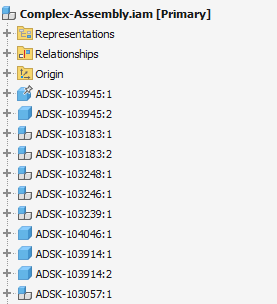
Sub main()
    Dim oAsmDoc As AssemblyDocument = ThisApplication.ActiveDocument
    Call TraverseAssembly(oAsmDoc.ComponentDefinition.Occurrences)
End Sub

Private Sub TraverseAssembly(Occurrences As ComponentOccurrences)
    On Error Resume Next
    Dim oOcc As ComponentOccurrence
    Dim lngPos As Long
    Dim IndexValue As String ' Renamed variable from "Index" to "IndexValue"

    For Each oOcc In Occurrences
        If oOcc.DefinitionDocumentType = kAssemblyDocumentObject Then
            Call TraverseAssembly(oOcc.SubOccurrences)
        End If

        lngPos = InStrRev(oOcc.Name, ":", -1)
        IndexValue = "" ' Initialize the new IndexValue variable
        IndexValue = Trim(Mid(oOcc.Name, lngPos, Len(oOcc.Name)))

        ' Use the renamed variable to update the occurrence name
        oOcc.Name = oOcc.Definition.Document.PropertySets.Item(3).Item("Description").Value & IndexValue
    Next
End Sub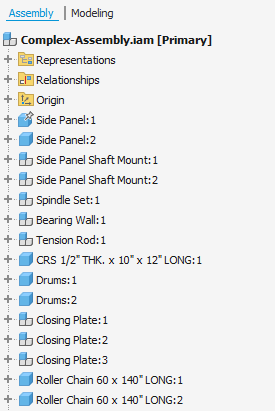
Sub main()
    Dim oAsmDoc As AssemblyDocument = ThisApplication.ActiveDocument
    Call TraverseAssembly(oAsmDoc.ComponentDefinition.Occurrences)
End Sub

Private Sub TraverseAssembly(Occurrences As ComponentOccurrences)
    On Error Resume Next
    Dim oOcc As ComponentOccurrence
    Dim lngPos As Long
    Dim IndexValue As String ' Renamed from "Index" to "IndexValue"

    For Each oOcc In Occurrences
        If oOcc.DefinitionDocumentType = kAssemblyDocumentObject Then
            Call TraverseAssembly(oOcc.SubOccurrences)
        End If

        lngPos = InStrRev(oOcc.Name, ":", -1)
        IndexValue = "" ' Initialize IndexValue variable
        IndexValue = Trim(Mid(oOcc.Name, lngPos, Len(oOcc.Name)))

        ' Use the renamed variable to update the occurrence name
        oOcc.Name = oOcc.Definition.Document.PropertySets.Item(3).Item("Part Number").Value & " (" & oOcc.Definition.Document.PropertySets.Item(3).Item("Description").Value & ")" & IndexValue
    Next
End Sub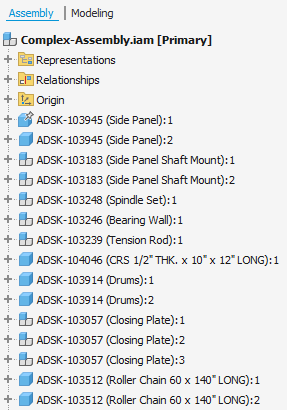
Hou er rekening mee dat bij het updaten van de iProperties van de components worden de namen in de browser niet automatisch geupdated. Gebruik een iLogic event trigger om de rule opnieuw op te roepen wanneer dit gebeurt of bij het openen of opslaan van je assembly.
Klik hier om te zien hoe je iLogic rules kan inladen en gebruiken in Inventor.
Controleer onze opleidingskalender voor meer informatie over Inventor.